
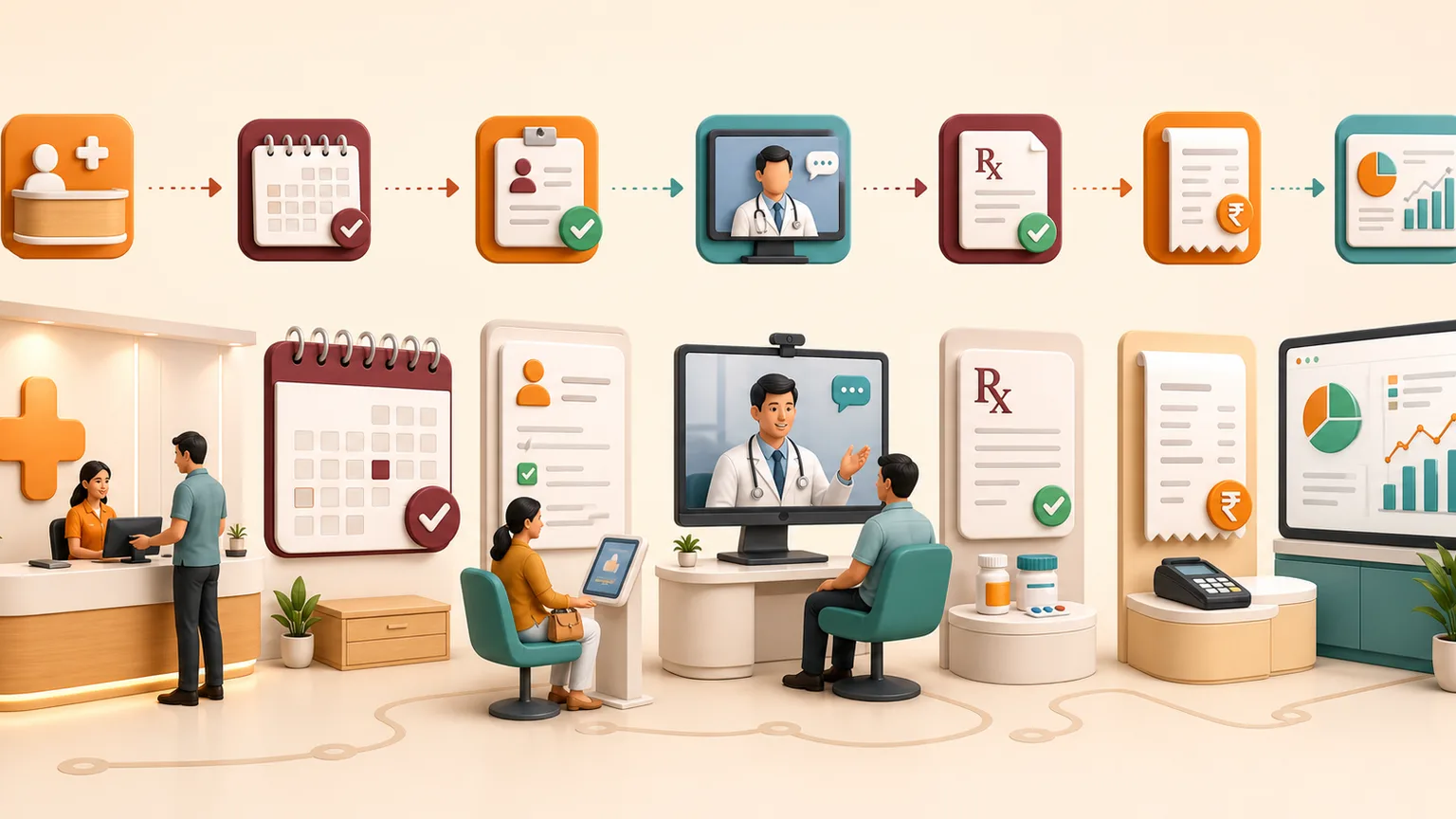
OPD management software helps clinics and hospitals organise the complete outpatient journey—from patient registration and appointments to consultation, prescription, billing and follow-up. It replaces disconnected registers and repeated entry with a controlled workflow shared by reception, doctors, billing teams and authorised management.
A useful system should make daily OPD work faster without forcing staff through unnecessary steps. It should also protect patient information through role-based access and give management dependable operational reports.
What is OPD management software?
OPD stands for outpatient department. Patients receive consultation, diagnostics, procedures or follow-up services without being admitted for an overnight stay. An OPD management system connects the information and actions required across that visit.
Depending on configuration, the system may manage patient profiles, UHID, doctor schedules, appointment slots, walk-in tokens, clinical notes, prescriptions, service orders, billing, payments, follow-ups and reports.
The complete OPD workflow
1. Patient registration and UHID
Reception searches for an existing patient before creating a new record, reducing duplicates. A unique health identifier can connect current and previous outpatient visits according to the organisation’s record policy.
2. Appointment or walk-in entry
Scheduled patients and walk-ins enter the appropriate doctor or department queue. Reception can record the visit reason, appointment time and relevant administrative details.
3. Queue and doctor schedule
The OPD queue gives staff a current view of waiting, in-consultation, completed or cancelled visits. Doctor calendars help avoid accidental overbooking and make availability clearer.
4. Consultation
Authorised clinicians open the patient and visit record, review available history, add clinical notes and record the assessment or services required. Templates should support the workflow without replacing clinical judgement.
5. Prescription and service orders
The doctor may add a prescription or order laboratory, diagnostic or procedure services. Access and approval should follow the hospital or clinic’s policy.
6. OPD billing and payment
The billing desk reviews consultation and service charges, applicable discounts and taxes, records the payment method and issues a receipt. Corrections and cancellations should be permission-controlled.
7. Follow-up and reports
A follow-up date can be scheduled, and authorised teams can use visit, doctor, department, service and collection reports for operational review.
Essential features of OPD software
- patient registration, search and duplicate prevention;
- UHID and demographic information;
- doctor calendars and appointment scheduling;
- walk-in registration and token or queue management;
- consultation notes and visit history;
- prescription workflow;
- service, diagnostic and procedure orders;
- OPD billing, payment and receipts;
- follow-up scheduling;
- role-based access and activity visibility;
- doctor, department, visit and collection reports; and
- multi-location support where required.
OPD management software for small clinics
A small clinic may not need every hospital module. A focused setup can begin with registration, appointments, consultation, prescriptions, billing and daily reports. Starting with the actual workflow reduces training effort and prevents unused features from making routine work harder.
Clinic OPD software becomes especially useful when several doctors share reception and billing staff, patients return for follow-ups, or management needs appointment and collection visibility outside the clinic.
OPD software for hospitals
A hospital OPD connects more departments and services. Registration, consultation, laboratory, diagnostics, pharmacy and billing may need coordinated identifiers and permissions. The organisation should document which information moves automatically and which actions require staff confirmation.
Integration requirements should be defined explicitly. A software brochure mentioning laboratory or pharmacy does not prove that every existing device, system or workflow is supported.
Benefits for each team
| Team | Practical benefit |
|---|---|
| Reception | Faster patient search, registration, appointments and queue visibility |
| Doctors | Controlled access to relevant visit history and consultation workflow |
| Billing | Connected services, charges, payments and receipts |
| Management | Current OPD volumes, doctor activity, services and collection reports |
| Patients | Clearer registration, queue, billing and follow-up process |
Security and privacy considerations
Patient information is sensitive. The system should apply role-based access, strong authentication, appropriate session controls, secure transmission, backups and activity visibility. Staff accounts should be individual rather than shared, and access should be removed promptly when responsibilities change.
Organisations remain responsible for defining lawful collection, access, retention, sharing and deletion practices. Software configuration should reflect applicable policy and regulatory advice.
Cloud versus desktop OPD management
| Area | Cloud OPD software | Traditional desktop setup |
|---|---|---|
| Access | Authorised browser access from supported locations | Often limited to installed computers or local networks |
| Updates | Managed centrally | May require local upgrades |
| Multi-location use | Can support connected locations | May require separate databases or synchronisation |
| Backups | Can be managed as part of the service | Often depends on local backup procedures |
| Connectivity | Requires dependable internet access | Local operation depends on the selected product |
How to evaluate an OPD management system
- Map the current patient journey from arrival to follow-up.
- List every role and the information each role genuinely needs.
- Ask the vendor to demonstrate both appointments and walk-ins.
- Create a returning patient and review the permitted visit history.
- Complete consultation, prescription, service billing and payment.
- Correct an entry and inspect the permission or activity record.
- Review doctor, department and collection reports.
- Confirm migration, training, backups, support and data export.
Frequently asked questions
What is OPD management software?
It connects outpatient registration, appointments and queues, consultations, prescriptions, billing, follow-ups and reports.
Is OPD software suitable for a small clinic?
Yes. A clinic can begin with focused registration, appointment, consultation, prescription and billing workflows.
Can it manage appointments and walk-in patients?
Yes. Reception can organise scheduled appointments and walk-ins in one current OPD queue.
Does OPD software include billing?
Yes. Consultation charges, services, applicable taxes, payments and receipts can be configured.
Can doctors access previous visits?
Authorised doctors can access the history and prior-visit information permitted for their role.
Can multiple clinic locations use the system?
Yes. Multi-location requirements and permissions can be configured after reviewing the organisation’s structure.
Does Esperto offer OPD software as a free download?
No. Esperto provides a managed cloud system through a guided demo and commercial implementation.
Build the OPD system around the patient journey
The best OPD software is not the system with the longest feature list. It is the one staff can use consistently while protecting information and giving management reliable visibility.
Explore Esperto OPD and Hospital Management Software or request a personalised OPD software demo.